impact AI Studio
Add Design Mode to ACT!
Turn simple prompts into useful actions, launch workflows inside ACT!, and connect to outside tools like Zapier with less clicking and faster results.
Ready to Turn Prompts into Action?
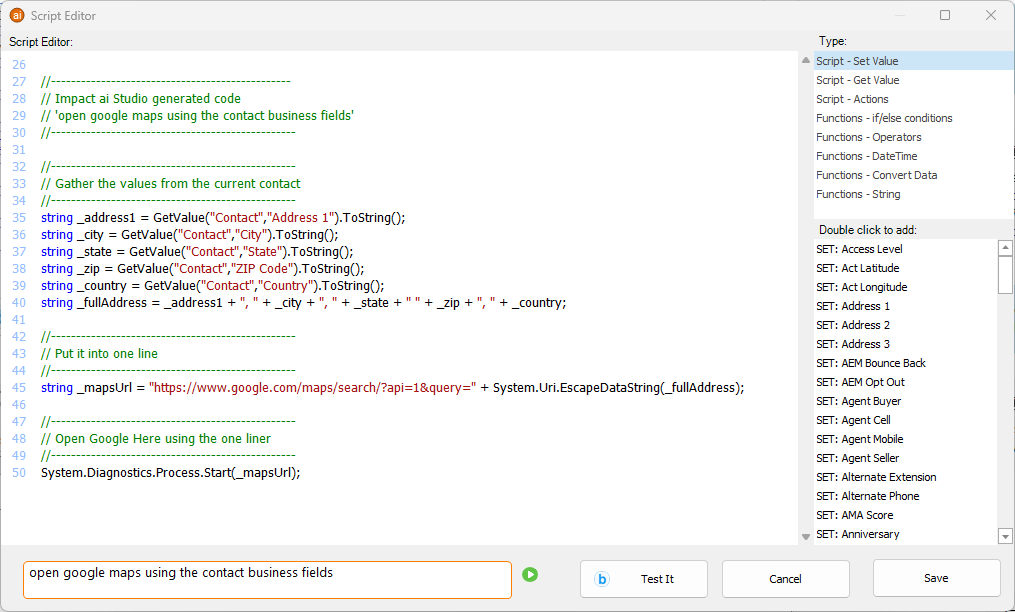
Design Actions Inside ACT!
Turn simple prompts into useful work inside ACT!.
Impact AI Studio Design Mode helps users launch actions, open forms, update records, calculate values, navigate to maps and websites, send emails, and trigger outside workflows without leaving ACT!.
Launch CRM Actions
Open forms, update contacts, create records, calculate values, and move work forward from a simple request.
Connect to Outside Tools
Trigger webhooks and connect ACT! to tools like Zapier so users can extend workflows, including sending text-message actions through connected services.
Keep It Simple
Users can choose from saved prompts, add their own custom prompts, or just type directly into the box to tell ACT! what they want done.
Design Mode Removes Workflow Friction
Many CRM tasks are simple, but they still take too many clicks. Opening forms, finding phone numbers, calculating totals, navigating to websites, and preparing follow-up work all slow users down.
Design Mode helps remove that friction by turning plain-language prompts into actions. Instead of hunting through menus and screens, users can ask for the result they want and move faster.
Less clicking. More doing. Faster workflow.
Sample Prompt Ideas
- Open a form to create a new contact and activity
- Open a form to update the current contact
- Call the contact or mobile phone number
- Get driving directions using MapQuest
- Send a funny or professional introductory email
- Navigate to the contact's web site
- Open a map using the business or home address
- Total the activities, time, records, or opportunity values
- Trigger a Zapier webhook to continue the workflow outside ACT!
What Design Mode Can Do
Design Mode helps ACT! users do more than ask questions. It helps them launch useful actions from the current record and turn prompts into workflow.
Open Forms
Launch create and update forms to work with contacts, activities, and other record actions faster.
Navigate and Communicate
Call phone numbers, open maps, launch websites, and prepare useful communication based on the current contact.
Calculate and Update
Count records, total activities, calculate opportunity values, and even write results back into ACT! fields.
Trigger Webhooks
Send data to Zapier and other connected services so ACT! can kick off text-message, notification, and follow-up workflows.
Built Around Simple Prompts
Design Mode comes with useful starter prompts, but that is only the beginning. Users can keep adding more prompts for the actions they use most often.
And when a saved prompt is not needed, they can simply type what they want into the prompt box and let Impact AI Studio turn that request into action.